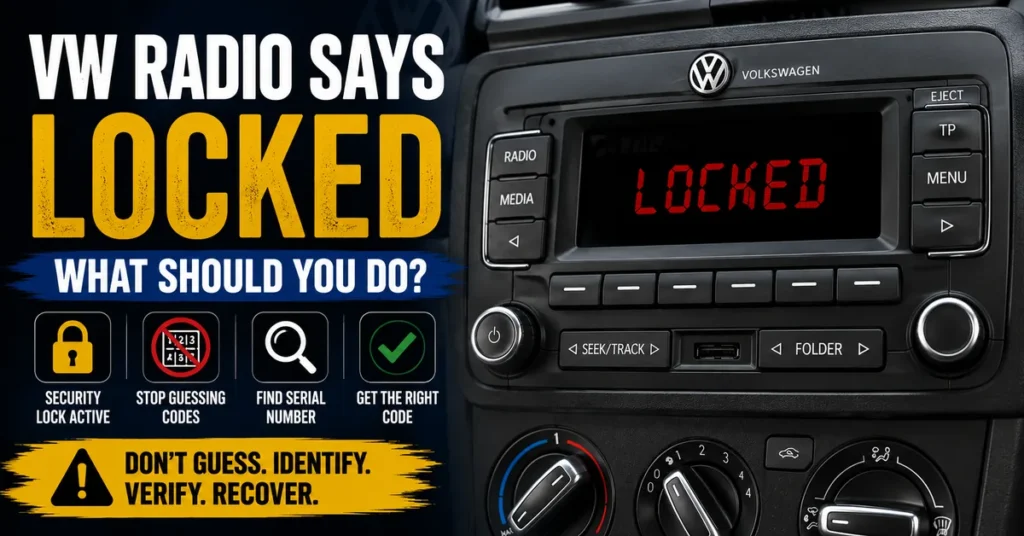
If your Volkswagen radio says LOCKED, the first thing to know is that you should not keep entering random radio codes.
A locked message generally means that the radio’s security system has temporarily restricted access or code entry. This can happen after incorrect code attempts, a previous security lockout, or another condition that prevents the radio from accepting another attempt.
In most situations, LOCKED does not automatically mean that the radio is permanently damaged.
The correct response is to identify the radio, determine why it entered the locked state, verify the radio’s identification information, and follow the appropriate recovery procedure.
What Does LOCKED Mean on a VW Radio?
When a Volkswagen radio displays LOCKED, the unit is indicating that its security system is currently preventing normal access or another code-entry attempt.
The exact meaning can vary depending on the radio model and security system. Volkswagen has used many different factory radios over the years, so the same message should not automatically be treated as an identical condition on every unit.
A locked radio may still have a perfectly functional display and electronics. The problem may simply be that the security system is restricting operation until the appropriate procedure has been completed.
LOCKED Is Not the Same as a Dead Radio
If the display is clearly showing LOCKED, the radio is receiving enough power to communicate its current status.
That is different from a radio with a completely blank display, no response, or obvious electrical symptoms.
Before assuming that a locked radio needs to be replaced, determine whether the problem is actually related to its security system.
Why Does a Volkswagen Radio Become LOCKED?
Several situations can lead to a Volkswagen radio becoming locked or temporarily restricting code entry.
Too Many Incorrect Code Attempts
One of the most common reasons is entering an incorrect security code.
Radio security systems are designed to prevent unlimited guessing. After unsuccessful attempts, some units can enter a temporary waiting or lockout state.
If this happened to your radio, continuing to enter different numbers is unlikely to solve the problem.
The Radio Previously Displayed SAFE
A Volkswagen radio may first display SAFE when its security system becomes active.
If unsuccessful attempts follow, the radio can move into a more restrictive state depending on the particular unit.
If you want to understand that earlier message, read our guide explaining what SAFE means on a VW radio.
The Radio Previously Displayed WAIT
Some radios temporarily prevent further code attempts after incorrect entries and display a waiting message.
If the unit has already gone through a WAIT condition, LOCKED may be related to the same security process.
The important point is to stop guessing and determine which security state the radio is actually in.
The Radio Was Removed or Replaced
A factory radio can also require security authorization after it has been removed from the vehicle or installed in another Volkswagen.
A replacement radio can be particularly confusing because its identification information may be completely different from the original radio that came with the vehicle.
What Should You Do If Your VW Radio Says LOCKED?
The best response is to stop making additional code attempts and work through the identification process.
- Stop entering random codes.
- Confirm that the radio has normal electrical power.
- Identify the exact radio currently installed.
- Find the radio serial number.
- Check the radio manufacturer and model.
- Determine whether the radio is original or a replacement.
- Find the recovery method that applies to that radio.
- Wait for any required lockout period to finish.
- Use only a confirmed code that belongs to the radio.
- Follow the correct code-entry procedure for the unit.
Step 1: Stop Entering Random Codes
This is the most important step.
If your Volkswagen radio already says LOCKED, another random attempt is not a good way to test whether a number works.
The radio has already indicated that its security system is restricting access. Additional unsuccessful attempts can make the recovery process more difficult on compatible units.
Instead, use the time to verify the radio identification and determine which code belongs to the unit.
Step 2: Identify the Exact Volkswagen Radio
Volkswagen has used many different radio systems across its vehicles and model years.
A Golf, Passat, Polo, Jetta, Tiguan, Sharan, or another Volkswagen can have different factory radios depending on the generation, equipment level, market, and previous repairs.
For this reason, the vehicle model alone is not always enough.
Look for information such as:
- Radio model
- Radio manufacturer
- Serial number
- Part number
- Other identification numbers
The information printed on the radio itself is often more useful than simply knowing the vehicle model.
Step 3: Find the Radio Serial Number
The radio serial number identifies the individual radio unit.
This is particularly important when the radio has been replaced because the current unit can have a different security identity from the original radio.
If you are not sure which number on the radio is the serial number, use our guide to finding your Volkswagen radio serial number.
Copy the Serial Number Carefully
Do not guess characters that are difficult to read.
Pay attention to letters and numbers that can look similar, such as:
- O and 0
- Z and 2
- I and 1
- Letters and numbers in the middle of the sequence
A single incorrect character can result in the wrong radio being identified.
Step 4: Determine Whether the Radio Was Replaced
This is an important step that is often overlooked.
If your Volkswagen has a replacement factory radio, the security information belonging to the original radio may not work with the replacement.
Always identify the radio that is physically installed in the dashboard.
The vehicle’s VIN and the original radio documentation can provide useful context, but they should not automatically be treated as identification for a replacement radio.
Step 5: Allow the Lockout to Finish
If the radio entered a temporary security lockout because of incorrect attempts, it may require a waiting period before code entry becomes available again.
The exact waiting procedure and duration depend on the radio system.
There is no single waiting time that applies to every Volkswagen radio.
Do not assume that switching the radio off and on, repeatedly pressing buttons, or disconnecting the vehicle battery will automatically clear the locked state.
Do Not Interrupt the Process Unnecessarily
If your particular radio requires a powered waiting period, interrupting the power supply may prevent the process from completing.
For that reason, do not disconnect the battery simply because the radio says LOCKED.
Does LOCKED Mean My VW Radio Is Permanently Locked?
Not necessarily.
A LOCKED message can describe a temporary security restriction rather than permanent hardware failure.
The exact behavior depends on the radio model and security system.
If the display is still working and the radio is clearly communicating its security state, do not assume that the unit needs to be replaced.
LOCKED vs SAFE vs WAIT vs SAFE 2
These messages can appear during different parts of a Volkswagen radio’s security process, but they should not be treated as identical messages on every radio.
| Message | General Meaning |
|---|---|
| SAFE | The radio’s security system is active. |
| SAFE 2 | A more restrictive security state on compatible radio systems. |
| WAIT | Code entry is temporarily unavailable while the radio waits. |
| LOCKED | The radio is currently restricting access or code entry. |
| CODE | The radio is requesting the appropriate security code. |
The exact sequence can differ between radio models, so the message should always be interpreted together with the radio’s identification information.
Can a Battery Change Cause a VW Radio to Become LOCKED?
A battery replacement or battery disconnect can cause a compatible Volkswagen radio to lose electrical power and request its security information again.
However, a battery change does not necessarily mean that the radio itself has been damaged.
If the radio was already subject to unsuccessful code attempts, the security state may also be related to those attempts.
The important distinction is between the event that caused the radio to request authorization and the event that caused it to become temporarily locked.
Can Disconnecting the Battery Unlock a Volkswagen Radio?
Disconnecting the battery is not a reliable way to bypass a Volkswagen radio security lockout.
The radio stores its security state internally, so removing power does not simply erase previous unsuccessful attempts.
Another power interruption can also create an additional security prompt when the radio starts again.
If the radio already says LOCKED, focus on identifying the unit and following its appropriate recovery procedure rather than repeatedly disconnecting the battery.
What If My VW Radio Was Replaced?
A replacement radio needs to be treated as its own unit.
The original radio may have had a different serial number, model number, and security identity.
If you purchased a used Volkswagen radio or installed another factory unit, identify the replacement radio before attempting to use information from the original stereo.
How Do You Recover a Locked VW Radio?
There is no single recovery method that applies to every Volkswagen radio.
The correct method depends on the radio model, manufacturer, serial-number family, and security system.
The general recovery process is:
- Identify the exact radio.
- Record the complete serial number.
- Check the manufacturer and model.
- Determine whether the radio is original or replaced.
- Identify the recovery method supported for that radio.
- Wait for any active lockout period to finish.
- Obtain or confirm the correct code.
- Enter it using the correct procedure.
If your radio requires a request-based recovery method, you can continue through the VW radio code request process after identifying the unit and gathering the required information.
What Information Do You Need for a Locked VW Radio?
Before attempting another recovery step, collect as much accurate information about the radio as possible.
| Information | Why It Helps |
|---|---|
| Radio model | Identifies the radio family. |
| Serial number | Identifies the individual radio. |
| Manufacturer | Helps determine the security system. |
| Part number | Provides additional radio identification. |
| Vehicle model | Provides vehicle context. |
| Vehicle year | Helps distinguish radio generations. |
| Original or replacement status | Helps determine which radio information is relevant. |
Can You Get a Locked VW Radio Code Online?
Some compatible Volkswagen radio systems can be supported by online code-recovery services using information from the radio.
However, there is no universal online calculator that should automatically be assumed to support every Volkswagen radio.
Before requesting a code, identify the radio and confirm that the recovery method applies to that specific unit.
Why Is My VW Radio Code Not Working?
If you already obtained a code but the radio remains locked, there are several possibilities.
The Serial Number Was Entered Incorrectly
Recheck the complete radio serial number. A single wrong character can identify the wrong unit.
The Code Belongs to Another Radio
This is particularly common when a replacement radio has been installed.
The Radio Is Still in a Lockout State
If the radio has not completed its required waiting period, it may not accept a new code attempt.
The Recovery Method Does Not Support That Radio
Different Volkswagen radio families can use different security systems. A method that works for one unit may not work for another.
What If the Radio Says LOCKED After SAFE 2?
If your Volkswagen radio previously displayed SAFE 2 and now shows a locked condition, stop entering additional codes.
SAFE 2 can represent a more restrictive security state on compatible Volkswagen radios following unsuccessful attempts.
The correct procedure depends on the radio, so identify the unit before attempting another code.
The goal is to recover the correct code and wait until the radio is ready to accept it, rather than trying to bypass the security system.
What If the Radio Says LOCKED After WAIT?
If the radio displayed WAIT before becoming locked, the two messages may be part of the same security process.
Do not assume that the waiting message can be bypassed by removing power or entering another code.
Allow the appropriate process to complete and verify the radio information before making another attempt.
How to Avoid Locking Your Volkswagen Radio Again
The easiest way to avoid another lockout is to eliminate guessing from the process.
- Identify the radio before looking for a code.
- Copy the serial number carefully.
- Confirm whether the radio has been replaced.
- Use a recovery method appropriate for the radio.
- Verify the code before entering it.
- Follow the correct button sequence for the radio.
- Stop immediately if the radio enters WAIT or another restrictive state.
What Should You Do Once the Radio Unlocks?
Once the radio is ready for code entry and you have the confirmed code, do not rush through the final step.
Verify that the code belongs to the radio currently installed in the vehicle.
Then follow the appropriate code-entry procedure for that particular radio.
Different Volkswagen radios can use different button sequences, so the procedure should match the actual unit.
When you have the correct information and code, use our guide to enter the Volkswagen radio code correctly.
Common Mistakes When a VW Radio Says LOCKED
- Entering random four-digit combinations.
- Trying another code before the waiting period finishes.
- Disconnecting the battery to try to clear the lockout.
- Using the vehicle VIN as if it were the radio serial number.
- Using information from the original radio after installing a replacement.
- Choosing a code method without identifying the radio.
- Ignoring the manufacturer and radio model.
- Continuing to make attempts after the display changes to WAIT or SAFE 2.
Frequently Asked Questions
What does LOCKED mean on a Volkswagen radio?
LOCKED generally means that the radio’s security system is currently restricting access or code entry. The exact behavior depends on the radio model.
Is a LOCKED VW radio permanently locked?
Not necessarily. A locked message can indicate a temporary security restriction rather than permanent hardware failure.
Why did my VW radio become locked?
Incorrect code attempts are one possible reason. A previous SAFE or WAIT condition, radio replacement, or another security-related condition can also be involved depending on the unit.
Can I unlock my VW radio by disconnecting the battery?
Disconnecting the battery is not a reliable way to remove a radio security lockout. It can also interrupt a waiting procedure on some systems.
How long does a locked VW radio stay locked?
There is no universal time for every Volkswagen radio. The waiting period depends on the radio and its security system.
Can I enter another code while LOCKED is displayed?
You should not try another random code while the radio is locked. First verify the radio identification and wait until the unit is ready for another authorized attempt.
What if my Volkswagen radio was replaced?
Identify the serial number of the replacement radio. Its security information can be different from the original factory radio.
Where do I find the serial number on a VW radio?
The serial number may be available in the original vehicle documentation or printed on a label attached to the radio. If you cannot find it, see our guide to finding the Volkswagen radio serial number.
Can every VW radio use the same code-recovery method?
No. Volkswagen has used many radio systems and manufacturers. The appropriate recovery method depends on the actual radio installed in the vehicle.
Final Answer: What to Do When Your VW Radio Says LOCKED
If your Volkswagen radio says LOCKED, do not panic and do not start trying random codes.
The message generally means that the radio’s security system is restricting access or code entry. It does not automatically mean that the radio is permanently damaged.
Start by identifying the exact radio currently installed, finding its serial number, and determining whether it is the original or a replacement unit.
Then allow any required lockout period to finish and use only a confirmed code that belongs to that radio.
If you need to continue the recovery process, start with the radio serial-number identification guide, then choose the recovery method appropriate for your unit.
The key rule is simple: identify the radio first, verify the information, and never guess your way through a security lockout.