A Volkswagen Beetle radio can suddenly ask for a security code after the battery has been disconnected, power has been lost, the radio has been removed, or another factory radio has been installed.
If your display shows SAFE, SAFE 2, CODE, or another security message, the first thing to do is not guess a number.
The better starting point is to identify the radio currently installed in your Beetle.
That distinction matters because Volkswagen has used different radio systems across the Beetle, New Beetle and later Beetle generations. A replacement radio can also have completely different identification information from the original unit.
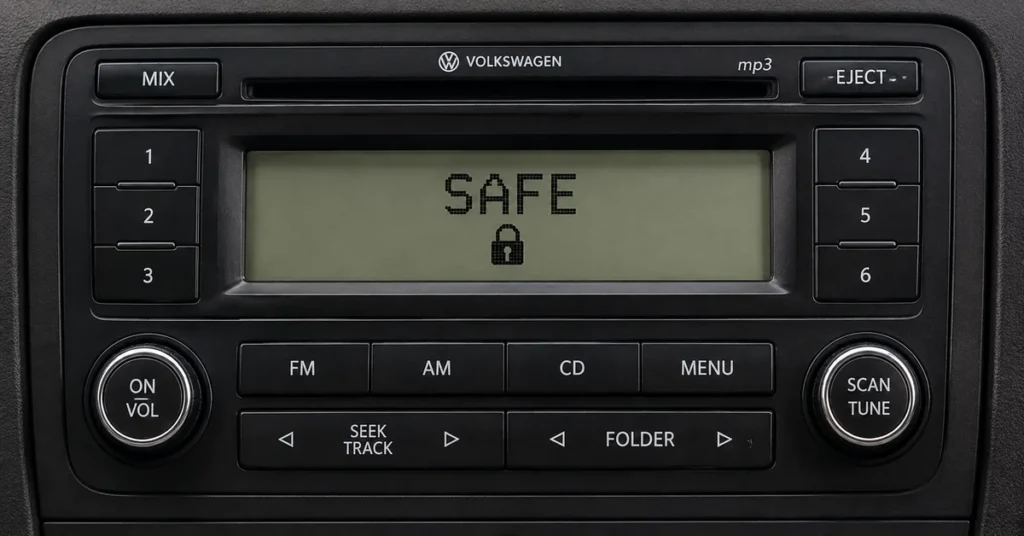
This guide explains how to identify a Volkswagen Beetle radio, where to find its serial number, how Beetle generations differ, what SAFE means, and how to choose the appropriate radio-code recovery method.
If you already have your radio serial number, start with our main VW Radio Code Calculator.
If you still need to locate the serial number, use our Volkswagen Radio Serial Number Guide.
The Beetle Is the Car. The Radio Has Its Own Identity.
This is the most important idea to understand when looking for a VW Beetle radio code.
The vehicle has a VIN.
The radio has its own identification.
Those two things are not interchangeable.
A Beetle can have a factory radio that was installed when the car was built, or it can have a replacement radio fitted later.
If the radio was replaced, the identification information from the original radio may no longer be relevant.
That is why the process should begin with the radio itself.
Information Worth Recording
| Information | Importance |
|---|---|
| Radio model | Essential |
| Radio serial number | Essential |
| Manufacturer | Useful |
| Part number | Very useful |
| Beetle generation | Useful |
| Model year | Useful |
| Display message | Useful |
| Original or replacement radio | Important |
You do not necessarily need every item immediately.
Start with the radio model and serial number whenever possible.
VW Beetle Radio Code by Generation
The name “Beetle” covers several different Volkswagen generations.
For radio-code research, that distinction matters.
The New Beetle and the later Beetle do not necessarily use the same radio systems, and the exact equipment can vary by market and trim level.
| Volkswagen model | Radio-code consideration |
|---|---|
| New Beetle | Identify the exact factory radio |
| Beetle | Identify the exact radio/infotainment system |
| Later Beetle models | Confirm whether a traditional radio-code system applies |
The vehicle generation gives you useful context.
The radio identification tells you what you actually need to know.
Volkswagen New Beetle Radio Code
The New Beetle was produced with several factory radio configurations.
If the radio has entered SAFE after losing power, identify the exact unit before searching for a code.
Look for:
- Radio model
- Serial number
- Manufacturer
- Part number
- Other identification numbers
Older Volkswagen radios can have several numbers printed on the same label.
Do not automatically assume that the largest number is the serial number.
If you need help locating the correct number, see our:
Find Your Volkswagen Radio Serial Number
Volkswagen Beetle Radio Code
Later Beetle models can use different factory radio and infotainment systems.
This is particularly important when searching for a “Beetle radio code generator.”
The phrase may suggest that one universal calculator works for every Beetle.
It does not.
The appropriate recovery method depends on the actual radio installed in the vehicle.
Before choosing a method, identify:
- Radio model
- Radio manufacturer
- Complete serial number
- Part number, if available
- Vehicle generation
- Security message displayed
Why the Radio Model Matters More Than the Engine
The previous version of this page included a very large list of Beetle engines, transmissions and horsepower figures.
Those specifications may describe the vehicle, but they do not identify the radio.
For a radio-code problem, the useful chain is:
Vehicle → Radio → Serial Number → Supported Recovery Method
The engine size, transmission and horsepower generally do not tell you which radio is installed.
That is why the rebuilt page focuses on the information that actually helps with radio identification.
How to Find the VW Beetle Radio Serial Number
Finding the serial number is often the most useful step when dealing with a lost radio code.
There are two places to look.
Check Your Volkswagen Documentation
Before removing the radio, check your existing paperwork.
Depending on the vehicle and radio, useful information may be found in:
- Owner documentation
- Radio documentation
- Security cards
- Service records
- Previous repair records
- Other paperwork supplied with the vehicle
If you find a radio code in the documentation, make sure it corresponds to the radio currently installed.
This is particularly important if the radio was replaced.
Check the Radio Identification Label
If the paperwork does not contain the required information, inspect the radio itself.
The identification label may be located on:
- Top of the radio
- Side of the radio
- Rear of the radio
- Radio chassis
Some units require removal from the dashboard.
If you are not comfortable removing a factory radio, use a qualified automotive audio technician.
For detailed instructions, see:
How to Find Your Volkswagen Radio Serial Number
What Does a VW Beetle Radio Serial Number Look Like?
Many older Volkswagen radios use identification numbers that begin with VWZ.
Examples of prefixes that may appear include:
- VWZ1Z1
- VWZ1Z2
- VWZ1Z3
- VWZ1Z7
- VWZ2Z2
- VWZ4Z4
- VWZ4Z6
- VWZ4Z7
- VWZ6Z1
- VWZ6Z7
These are examples of identification formats.
The VWZ portion is not necessarily the entire serial number.
If additional letters or numbers appear after the prefix, record the complete sequence.
Do not shorten the number.
Radio Serial Number vs Part Number
One of the easiest mistakes is confusing the serial number with another number printed on the radio label.
A typical label can contain several identifiers.
| Number | What it identifies |
|---|---|
| Serial number | Individual radio |
| Model number | Radio model |
| Part number | Factory/component identification |
| Manufacturer information | Radio manufacturer |
| VWZ number | Common identification format on many VW radios |
| Barcode information | Additional factory identification |
The longest number is not automatically the serial number.
Read the descriptions around the numbers carefully.
Check Every Character on the Radio Label
Radio labels can be difficult to read.
Some letters and numbers can look almost identical.
Pay particular attention to:
- 0 and O
- 1 and I
- 2 and Z
- 5 and S
- 6 and G
- 8 and B
If possible, photograph the entire label before entering the information anywhere.
Then compare the number you typed with the original photograph.
This simple step can prevent a lot of unnecessary troubleshooting.
VW Beetle Radio Code Calculator
A VW Beetle radio code calculator is a tool or service intended to determine a compatible security code using identifying information from a supported Volkswagen radio.
The important word is supported.
Volkswagen has used multiple radio families, manufacturers and security systems.
Therefore, one calculation method should not automatically be assumed to work for every Beetle radio.
If you already know the radio’s serial number, continue to the main:
VW Beetle Radio Code Generator
The term VW Beetle radio code generator is another phrase people commonly use when searching for a lost radio code.
A generator should not be treated as a universal solution.
Before choosing any recovery method, identify:
- Beetle generation
- Radio model
- Radio manufacturer
- Complete serial number
- Part number, if available
- Current display message
Then determine whether the specific radio is supported.
The process should be:
Identify → Verify → Recover → Enter
not:
Guess → Enter → Guess Again
Can I Get a Beetle Radio Code From the VIN?
The VIN identifies the Volkswagen Beetle.
The radio serial number identifies the radio.
These are different forms of identification.
The VIN can provide useful vehicle information, but it should not automatically be treated as the radio’s serial number.
This becomes even more important if the radio has been replaced.
If you need to find the radio’s own identification information, use:
Find Your Volkswagen Radio Serial Number
What If My Beetle Radio Was Replaced?
A replacement radio changes the identification situation.
Imagine that your Beetle originally had Radio A.
Later, Radio A was removed and a used factory Radio B was installed.
Radio B now has its own identification.
The code associated with Radio A may not unlock Radio B.
Replacement Radio Checklist
| Check | What to record |
|---|---|
| Current radio | Exact unit installed |
| Radio model | Model designation |
| Serial number | Complete number |
| Part number | If visible |
| Manufacturer | If visible |
| Beetle generation | New Beetle or Beetle |
| Display message | SAFE, SAFE 2, CODE, etc. |
Always use the identification of the radio that is currently installed.
What Does SAFE Mean on a VW Beetle Radio?
If the display shows SAFE, the radio security system is active.
This can happen after:
- Battery replacement
- Battery disconnection
- Loss of electrical power
- Radio removal
- Replacement-radio installation
- Other security-related events
SAFE does not automatically mean that the radio is broken.
It can simply indicate that the radio requires the appropriate security procedure.
What Does SAFE 2 Mean?
Some Volkswagen radio systems can display SAFE 2 after unsuccessful code attempts.
If SAFE 2 appears:
Stop entering random codes.
The radio may have entered a temporary lockout state.
The exact procedure depends on the radio model.
Do not assume that a procedure for one Beetle radio applies to another.
Identify the unit first.
Why Is My Beetle Radio Code Not Working?
There are several possible reasons.
The Serial Number Is Incorrect
A single wrong character can result in the wrong radio identification.
The Code Belongs to Another Radio
This can happen when a replacement radio has been installed.
The Wrong Radio Model Was Selected
Different radio families can use different security systems.
The Radio Is Temporarily Locked
SAFE 2 may indicate that another attempt is not currently available.
The Entry Procedure Is Incorrect
A correct code can still fail if the radio-specific confirmation procedure is not followed.
If you already have a confirmed code, see:
VW Beetle Radio Models
Volkswagen has used multiple factory radio families in Beetle-related vehicles.
Depending on the generation and equipment, you may encounter systems from families such as:
- Alpha
- Beta
- Gamma
- RCD
- RNS
- Other Volkswagen factory radio systems
The exact model matters.
Two radios that look similar from the front can have different identification information and different security procedures.
VW Beetle Alpha Radio Code
If your Beetle is equipped with an older Alpha radio, identify the exact unit and locate its serial number before attempting recovery.
Do not assume that a code from another Volkswagen radio will work.
VW Beetle Beta Radio Code
Beta radios can appear in older Volkswagen applications.
If the radio displays SAFE, record its complete identification information before choosing a recovery method.
VW Beetle Gamma Radio Code
Gamma radios were used across different Volkswagen applications.
The exact model and serial number should be identified before attempting to recover a code.
VW Beetle RCD Radio Code
RCD radios were used in various Volkswagen vehicles and generations.
There are multiple RCD models, so knowing only that the radio is an RCD unit may not be enough.
Record the exact model and serial number.
VW Beetle RNS Radio Code
RNS systems combine radio and navigation functions.
Different RNS generations can use different security and identification procedures.
If your Beetle has an RNS unit, identify the exact model before assuming a traditional radio-code method applies.
Older Beetle vs Newer Beetle Radio Systems
This distinction is important.
Older Volkswagen radios often use traditional security-code systems.
Newer infotainment systems can use more advanced security, authorization or pairing procedures.
Therefore, do not automatically apply an old four-digit radio-code process to a modern infotainment system.
First identify the exact system.
How to Recover a VW Beetle Radio Code
Once the radio is identified, the process becomes much easier.
Step 1: Identify the Beetle
Determine whether you have a New Beetle or later Beetle and note the approximate model year.
Step 2: Identify the Radio
Find the exact model and manufacturer.
Step 3: Find the Serial Number
Check the documentation or radio label.
Step 4: Verify the Number
Compare every character carefully.
Step 5: Determine the Supported Method
Not every Volkswagen radio uses the same recovery method.
Step 6: Recover the Code
Use the appropriate method for the specific radio.
Step 7: Enter the Code
Follow the procedure for the exact radio.
For the main recovery process, continue to:
How to Submit a VW Beetle Radio Code Request
If you have identified the radio but need to submit information for a request, prepare the details first.
Use our:
Submit VW Radio Code Calculator Request
Information to Prepare
| Information | Importance |
|---|---|
| Vehicle | Volkswagen Beetle |
| Model year | Useful |
| Beetle generation | Useful |
| Radio model | Essential |
| Serial number | Essential |
| Manufacturer | Useful |
| Part number | Useful |
| Display message | Useful |
| Replacement radio | Important |
Accurate radio information is much more useful than a long list of unrelated vehicle specifications.
How to Enter a VW Beetle Radio Code
Once you have a confirmed code for the radio currently installed, the final step is entering it.
The exact procedure depends on the radio.
Older Volkswagen radios can use numbered preset buttons to select individual digits, while other systems may use different controls.
Do not assume that every Beetle radio uses the same button sequence.
For detailed guidance:
Before Confirming the Code
Check:
| Check | Confirm |
|---|---|
| Correct radio | ✓ |
| Complete serial number | ✓ |
| Correct recovery method | ✓ |
| Confirmed code | ✓ |
| Radio ready for code entry | ✓ |
| Correct entry procedure | ✓ |
If something is uncertain, verify it first.
Do Not Guess a Beetle Radio Code
Random code attempts are not a good recovery strategy.
If the radio enters a temporary lockout state, you can make the situation more difficult.
The better approach is:
Identify the radio.
Find the serial number.
Verify the identification.
Use the appropriate recovery method.
Enter the confirmed code carefully.
What Information Should I Photograph?
If you have access to the radio label, take a clear photograph of the entire label.
Try to include:
- Serial number
- Model number
- Part number
- Manufacturer
- Barcode
- Other identification numbers
Do not crop the beginning or end of the label.
A complete image can help distinguish the serial number from the other numbers printed around it.
VW Beetle Radio Code by Model Year
Model year can provide context, but it should not be the only identification.
| Information | Purpose |
|---|---|
| Model year | Helps identify generation |
| Beetle generation | Narrows radio possibilities |
| Radio model | Identifies the system |
| Serial number | Identifies the radio |
| Part number | Additional confirmation |
| Manufacturer | Helps distinguish units |
A Beetle’s radio equipment can vary by market and specification.
Therefore, the radio itself should remain the primary focus.
What If I Cannot Find the Serial Number?
Start with the original vehicle and radio documentation.
If the number is not there, inspect the radio’s identification label.
Some radios need to be removed from the dashboard to access the label.
Do not force the unit.
If you are unsure about removing it, use a qualified automotive audio technician.
Once you have the number, continue to:
What If I Already Have the Beetle Radio Code?
If you already have a confirmed code, you do not need to search for another code.
The next step is to enter it correctly.
Because button sequences vary between radio models, use the instructions appropriate for the specific unit.
See:
Beetle Radio Code Troubleshooting
| Problem | What to check |
|---|---|
| SAFE appears | Identify the radio and security procedure |
| SAFE 2 appears | Stop guessing and check the lockout procedure |
| Code rejected | Verify serial number and radio model |
| Replacement radio | Use the current radio’s identification |
| Cannot find serial number | Check documentation or radio label |
| Unsure about code entry | Use radio-specific instructions |
| Modern infotainment | Confirm whether a traditional code applies |
Frequently Asked Questions About VW Beetle Radio Codes
How do I get a VW Beetle radio code?
Identify the radio currently installed in your Beetle and find its complete serial number. Then determine which recovery method applies to that radio.
What is a VW Beetle radio code calculator?
It is a calculator or recovery service intended to determine a security code for a supported Volkswagen radio using identifying information from that unit.
What is a VW Beetle radio code generator?
It is another common term for a service that determines a radio security code using supported radio identification information.
Does every Beetle use the same radio code?
No. Beetle and New Beetle vehicles can use different radio systems depending on generation, year, equipment and market.
Can I get a Beetle radio code from the VIN?
The VIN identifies the vehicle. The radio serial number identifies the radio. The radio’s own identification is particularly important if the unit has been replaced.
Where is the Beetle radio serial number?
It may be recorded in the original documentation or printed on a label attached to the radio.
What does VWZ mean on a Beetle radio?
VWZ is part of an identification format used on many Volkswagen factory radios. It should not be confused with the security code itself.
My Beetle radio says SAFE. What should I do?
Identify the exact radio and determine the appropriate security procedure. Do not enter random codes.
What does SAFE 2 mean?
SAFE 2 can indicate a temporary lockout after unsuccessful attempts. Stop guessing and follow the procedure appropriate for the radio.
What if my Beetle radio was replaced?
Use the identification information from the replacement radio. Do not automatically use the code associated with the original radio.
Can I use the same code on another Volkswagen radio?
Do not assume that a code from one radio will work on another unit. The radio identification must match.
Why is my Beetle radio code not working?
Check the serial number, radio model, replacement-radio status, code and entry procedure.
How do I enter a VW Beetle radio code?
The exact process depends on the radio. Some older units use numbered preset buttons while other systems can use different controls.
See our VW Radio Code Entry Guide.
The Beetle Radio-Code Formula
If you remember only one thing from this guide, remember this:
Beetle → Radio → Serial Number → Supported Method → Code → Entry
The vehicle model gets you started.
The radio identification gets you to the correct solution.
That distinction is especially important when the radio has been replaced.
Start Your VW Beetle Radio Code Search
If your Volkswagen Beetle radio is displaying SAFE, SAFE 2, CODE, or asking for a security code, begin with the radio currently installed in the vehicle.
If you need to find the serial number:
Find Your Volkswagen Radio Serial Number
If you already have the radio information:
If you need to prepare a request:
Submit a VW Radio Code Calculator Request
If you already have the confirmed code:
The important step is to identify the actual radio installed in your Volkswagen Beetle, rather than relying only on the vehicle name or VIN.
VWRadiocode.com focuses on Volkswagen radio identification, serial-number guidance, radio-code recovery information and safe code-entry procedures.