If your Volkswagen radio displays SAFE and then changes to 1000, you may wonder whether 1000 is an error, a radio code, or another type of security warning.
On many older Volkswagen factory radios, 1000 indicates that the radio has reached the security-code entry stage. It does not normally mean that 1000 is the actual code needed to unlock your radio.
This distinction is important. Entering 1000 as though it were your security code, or experimenting with random numbers, can result in an incorrect attempt and may eventually place some radios into a temporary lockout.
Before changing any digits, identify the radio and make sure you have the correct security code for the unit currently installed in your Volkswagen.
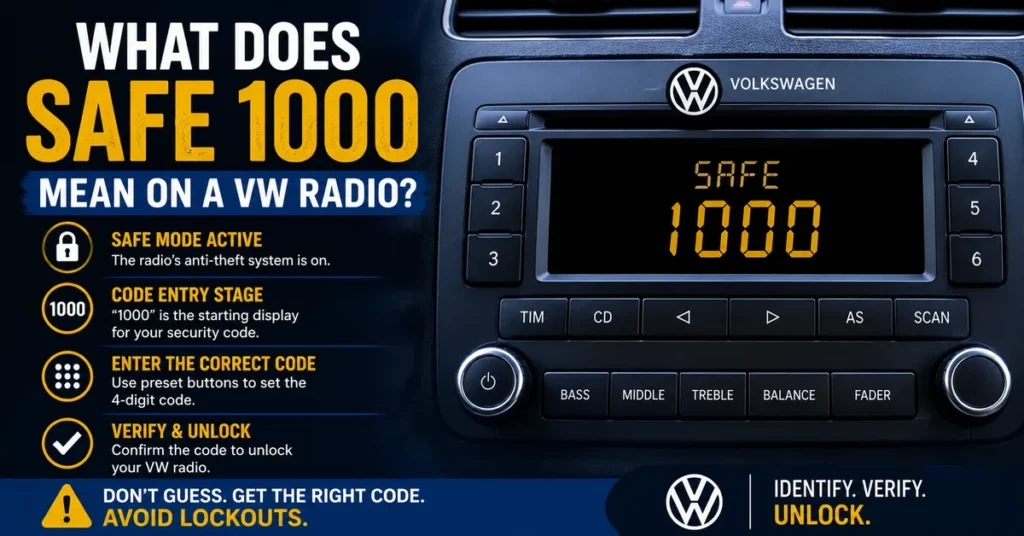
What Does SAFE 1000 Mean on a Volkswagen Radio?
SAFE is associated with the anti-theft security system used by many older Volkswagen factory radios.
After the radio loses power or its security system becomes active, it may initially display SAFE.
Once the radio is ready for code entry, some units can display 1000.
Think of 1000 as the starting display from which the correct security code can be selected on compatible radios.
It should not automatically be interpreted as the radio’s actual unlock code.
Is 1000 the VW Radio Code?
No—not simply because 1000 appears on the display.
On compatible Volkswagen radios, the four digits displayed as 1000 provide the starting positions used when entering the actual security code.
Your radio’s correct code may be completely different.
Do not confirm 1000 unless you already know that 1000 is genuinely the security code assigned to your particular radio.
Why Does My VW Radio Show SAFE and Then 1000?
The sequence can be part of the normal security-code entry process on certain older Volkswagen radios.
A typical situation looks like this:
- The radio loses electrical power.
- The anti-theft security system becomes active.
- The radio displays SAFE.
- The appropriate procedure is used to reach code-entry mode.
- The display changes to 1000.
- The correct four-digit security code can then be selected.
- The code must be confirmed using the procedure for that particular radio.
The exact sequence and buttons vary between radio models, so do not assume that instructions for one Volkswagen radio automatically apply to another.
Why Does a Volkswagen Radio Enter SAFE Mode?
SAFE mode is part of the radio’s anti-theft protection.
It can become active after situations such as:
- Disconnecting the vehicle battery
- Replacing the battery
- Loss of electrical power
- Removing the radio
- Installing a factory radio in another vehicle
- Electrical repairs that interrupt radio power
If you want a more detailed explanation of the initial security message, read our guide explaining what SAFE means on a Volkswagen radio.
Does SAFE 1000 Mean the Radio Is Ready for a Code?
On radio models that use this display sequence, seeing 1000 generally indicates that you have reached the code-entry stage.
That does not mean you should immediately start experimenting with the preset buttons.
Before entering anything, make sure:
- You know the exact radio model.
- You have identified the radio serial number correctly.
- You have the confirmed security code for that radio.
- The radio is ready to accept another attempt.
- You know the correct confirmation procedure.
If any of these details are uncertain, stop before entering a code.
How Does Code Entry Work When the VW Radio Shows 1000?
Many older Volkswagen radios that use the 1000 display allow the four digits to be changed using the radio’s preset buttons.
For example, preset buttons can correspond to individual positions in the four-digit security code.
Pressing a button repeatedly changes the digit in its corresponding position until the required number is displayed.
However, the exact controls and confirmation sequence depend on the radio model.
Do not follow a button combination intended for a different radio simply because both units display SAFE.
Example of What 1000 Represents
Suppose the confirmed radio code is a different four-digit number.
The display may initially show:
1000
The appropriate preset controls are then used to change those positions until the display matches the confirmed security code.
Only after checking every digit should the code be confirmed according to the instructions for that radio.
This example explains the role of the 1000 display; it is not a universal button procedure for every Volkswagen radio.
Do Not Confirm 1000 by Mistake
This is one of the most important precautions when the display reaches 1000.
If 1000 is simply the starting display and you confirm it without changing the digits to your actual security code, the radio may register an incorrect code attempt.
Repeated incorrect attempts can lead to a more restrictive security state on some Volkswagen radios.
Therefore:
- Do not assume 1000 is your code.
- Do not confirm a number unless you know it is correct.
- Do not experiment with random combinations.
- Stop if you are uncertain about the radio or code.
What If I Don’t Know My VW Radio Code?
If the display shows 1000 but you do not know the correct security code, this is the point where you should stop.
Do not use the radio itself to test possible combinations.
Instead, identify the exact radio installed in the vehicle.
The radio serial number is particularly important because it identifies the radio rather than simply identifying the Volkswagen vehicle.
If you do not know where to locate it, follow our guide for finding the serial number on a VW radio.
Why the Radio Serial Number Matters
Volkswagen has used different radio manufacturers, models, and security systems over the years.
Two Volkswagen vehicles of the same model can have different radios, especially if they were produced in different years or markets.
A previous owner may also have replaced the original unit.
Useful identification information can include:
| Information | Why It Matters |
|---|---|
| Radio serial number | Identifies the individual radio |
| Radio model | Helps determine the correct procedure |
| Manufacturer | Helps identify the radio family |
| Part number | Provides additional identification |
| Vehicle model and year | Provides useful context |
| Original or replacement radio | Helps determine which security information is relevant |
What If the Radio Is a Replacement Unit?
If another factory radio was installed in your Volkswagen, the security code associated with the original radio may not belong to the replacement.
This is why you should identify the radio currently installed rather than relying only on paperwork that came with the vehicle.
The replacement radio has its own identification information and may require its own security code.
What Happens If You Enter the Wrong Code?
An incorrect security code can count as a failed attempt.
Depending on the radio, repeated unsuccessful attempts can result in a temporary lockout and prevent immediate code entry.
The radio may then display a different security message instead of returning immediately to the 1000 entry screen.
This is why code verification should happen before you enter the digits.
What If SAFE 1000 Changes to SAFE 2?
If the radio changes to SAFE 2 after unsuccessful attempts, stop trying additional codes.
On compatible Volkswagen radios, SAFE 2 can indicate a more restrictive security state in which another attempt is temporarily unavailable.
The radio may need to complete a waiting period before it allows code entry again.
For a detailed explanation, see our guide to Volkswagen SAFE 2 mode.
SAFE vs SAFE 2 vs 1000 vs CODE
These displays can represent different stages of the Volkswagen radio security process.
| Display | What It Generally Means |
|---|---|
| SAFE | The radio’s anti-theft security system is active. |
| 1000 | Code-entry starting display on compatible older radios. |
| CODE | The radio is requesting security-code entry on compatible systems. |
| SAFE 2 | A more restrictive security state that can follow unsuccessful attempts on some radios. |
Not every Volkswagen radio uses all of these messages, and the sequence can vary between radio families.
Does SAFE 1000 Mean My VW Radio Is Broken?
No. Seeing SAFE followed by 1000 does not by itself indicate a defective radio.
On a compatible unit, it can simply mean that the anti-theft system was activated and the radio has reached its code-entry stage.
A radio with no display, no power, damaged controls, or other electrical symptoms is a different problem.
If 1000 appears clearly on the display, focus first on the security-code process.
Why Does SAFE 1000 Appear After a Battery Change?
A battery replacement can interrupt electrical power to the radio.
On Volkswagen radios that use a traditional anti-theft code, losing power can cause the security system to request authorization again.
The radio may first display SAFE and then allow you to reach the 1000 code-entry screen.
This does not necessarily indicate a problem with the new battery.
The battery change may simply have triggered the radio’s security procedure.
Can Disconnecting the Battery Clear SAFE 1000?
Disconnecting the battery is not a reliable method for bypassing the radio security system.
If the radio is already waiting for its security code, removing power does not give you the correct code.
It can also interrupt a waiting procedure if the radio has entered a timed lockout.
Instead of disconnecting the battery again, identify the radio and obtain the correct security information.
How to Recover the Correct Code Before Using the 1000 Screen
If you do not already have the confirmed code, the safest approach is to gather the radio identification information before touching the code-entry controls.
- Identify the exact radio model.
- Locate the complete serial number.
- Record the manufacturer and part number when available.
- Determine whether the radio is original or replaced.
- Choose a recovery method that supports that radio.
- Verify the recovered code.
- Return to the radio only when you are confident the code is correct.
If your radio requires a request-based recovery method, you can continue through our Volkswagen radio code request page after collecting the required information.
How to Enter a VW Radio Code From the 1000 Screen
Once you have the confirmed security code, you can proceed with the code-entry method appropriate for your radio.
On many older units, preset buttons are used to change the four positions displayed on the screen.
Before confirming anything:
- Check all four digits.
- Make sure the code belongs to the installed radio.
- Make sure you understand the confirmation buttons.
- Do not press the confirmation combination until the displayed number is correct.
Because the exact button sequence varies, use the procedure that matches your radio. Our VW radio code entry guide explains the next stage of the process.
What If the 1000 Screen Does Not Appear?
Not every Volkswagen radio uses a 1000 display.
If your radio remains on SAFE, shows SAFE 2, displays WAIT, says CODE, or shows another message, do not force a procedure designed for a different radio.
First identify the radio model and determine what its particular display means.
This is especially important because Volkswagen has used radios from different manufacturers and generations.
Common Mistakes With VW SAFE 1000
- Assuming 1000 is automatically the unlock code.
- Confirming 1000 without knowing the actual security code.
- Trying random four-digit combinations.
- Using a code that belongs to a previous radio.
- Using vehicle information without identifying a replacement radio.
- Copying the serial number incorrectly.
- Following instructions for a different radio model.
- Continuing to make attempts after SAFE 2 or another lockout message appears.
Frequently Asked Questions About VW SAFE 1000
What does SAFE 1000 mean on a VW radio?
On many older Volkswagen radios, SAFE indicates that the anti-theft security system is active, while 1000 is the starting display used when the radio reaches the security-code entry stage.
Is 1000 my Volkswagen radio code?
Not necessarily. On compatible radios, 1000 is usually the initial code-entry display. Do not confirm it unless you know that 1000 is actually the correct code for your radio.
Why did my VW radio change from SAFE to 1000?
The change can indicate that the radio has moved from its SAFE security display into the stage where a security code can be entered.
Can I type my code when 1000 appears?
If your radio model uses 1000 as its code-entry screen and you have a confirmed code, you can follow the code-entry procedure specified for that radio. Do not enter a code if you are uncertain that it belongs to the unit.
What happens if I accidentally confirm 1000?
If 1000 is not the correct security code, confirming it may count as an incorrect attempt on compatible radios. Stop and verify the correct code before trying again.
Why does my VW radio show SAFE 2 instead of 1000?
SAFE 2 can indicate a more restrictive security state on some Volkswagen radios, often associated with unsuccessful code attempts. Another attempt may not be available until the required waiting procedure has been completed.
Will disconnecting the battery reset SAFE 1000?
Battery disconnection is not a reliable way to bypass Volkswagen radio security. The correct approach is to identify the radio and use the appropriate security code and entry procedure.
Does every VW radio display 1000?
No. Volkswagen has used many radio systems, and not all of them use the same displays or code-entry procedures.
What should I do if I don’t know the code?
Do not guess. Identify the radio, locate its serial number, determine which recovery method supports the unit, and obtain a confirmed code before making another attempt.
Final Answer: What Does SAFE 1000 Mean on a VW Radio?
When an older Volkswagen radio displays SAFE followed by 1000, it generally means that the anti-theft security system was active and the radio has now reached its code-entry stage.
1000 should not automatically be treated as your radio code.
On compatible radios, it is the starting display from which the correct four-digit security code is selected.
If you already know the confirmed code, follow the entry procedure for your exact radio model carefully.
If you do not know the code, stop before changing or confirming the digits. Identify the radio, record its serial number, and use the recovery method appropriate for that unit.
Never assume 1000 is the answer and never use the radio to guess possible codes. Verify the correct code first, then enter it carefully when the radio is ready.