
If your Volkswagen radio suddenly displays WAIT, it can be confusing, especially if the radio was working normally before a battery change, power interruption, or an unsuccessful code-entry attempt.
In most cases, WAIT means that the radio has temporarily blocked code entry. The security system is preventing another attempt until the required waiting period has passed.
This does not automatically mean that your Volkswagen radio is damaged.
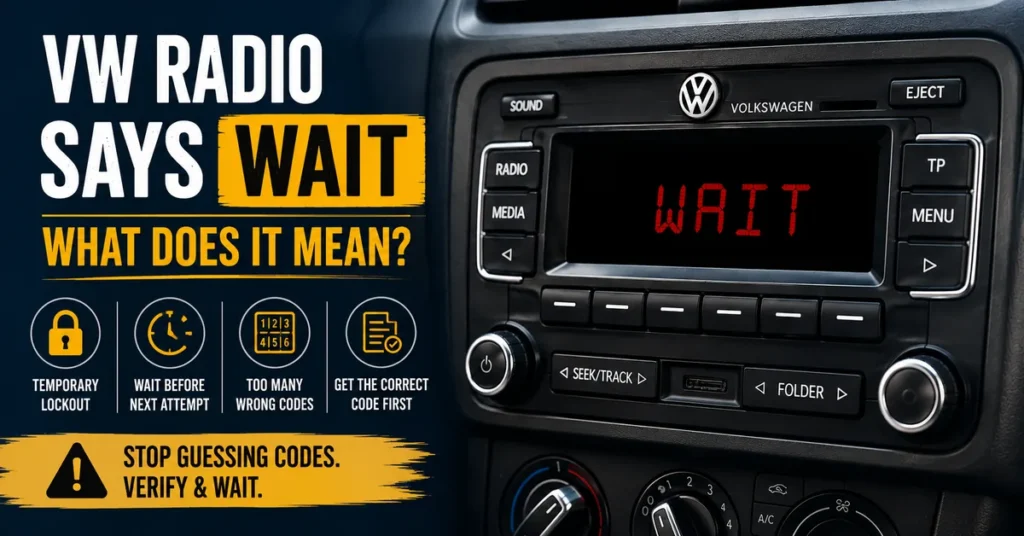
The most important thing is to stop guessing codes and determine why the WAIT message appeared before trying anything else.
What Does WAIT Mean on a VW Radio?
When a Volkswagen radio displays WAIT, the unit is generally in a temporary security lockout state.
This can happen after one or more unsuccessful attempts to enter a radio security code. Depending on the radio model, manufacturer, and security system, the display may use different messages or change between messages during the lockout process.
The purpose of the waiting period is to prevent repeated attempts at guessing the radio’s security code.
Therefore, WAIT should not be treated as a new code that you need to enter.
WAIT Is Usually a Temporary Lockout
The most important distinction is that WAIT normally describes the radio’s current security state, not the four-digit security code itself.
If you see WAIT, entering another random combination is not the solution.
The safer approach is to allow the radio to complete its required waiting period and then continue only when you have verified the correct code for the radio currently installed in the vehicle.
Why Does a Volkswagen Radio Show WAIT?
There are several situations that can lead to a waiting message.
Too Many Incorrect Code Attempts
One of the most common reasons is that an incorrect radio code has been entered.
Volkswagen radio security systems are designed to prevent unlimited code attempts. After unsuccessful attempts, some units temporarily prevent further code entry.
WAIT can therefore be a warning that the radio is no longer accepting another attempt at that moment.
The Radio Previously Entered SAFE 2
Some Volkswagen radios use messages such as SAFE or SAFE 2 to indicate different security states.
If incorrect codes have already been entered, the radio may progress into a more restrictive temporary lockout condition.
If your radio has already displayed SAFE 2, do not continue trying different numbers. First make sure that you have identified the exact radio and obtained the correct code.
If you want to understand the earlier security state in more detail, see our guide to Volkswagen SAFE 2 mode.
The Radio Lost Power During the Recovery Process
A battery disconnect, battery replacement, electrical repair, or radio removal can also affect the security state of a Volkswagen radio.
However, WAIT should not be treated as proof that the battery itself is defective.
The display is telling you that the radio’s security system is currently controlling access to code entry.
How Long Does a VW Radio Stay on WAIT?
There is no single waiting time that applies to every Volkswagen radio.
The required period depends on the particular radio, its security system, the number of previous unsuccessful attempts, and how the unit handles its lockout procedure.
Some older Volkswagen radios can require a substantial uninterrupted waiting period before code entry becomes available again.
For that reason, you should not assume that every VW radio will unlock after exactly the same number of minutes.
Why the Waiting Period Can Be Important
The waiting period is part of the radio’s anti-theft protection.
If a person could simply enter unlimited combinations one after another, the security code would provide very little protection.
By temporarily blocking the controls, the radio makes repeated guessing much more difficult.
What Should I Do When My VW Radio Says WAIT?
The first step is simple: stop entering codes.
Do not try another number just to see whether it works.
Instead, follow this sequence:
- Stop entering additional codes.
- Identify the exact Volkswagen radio installed in the vehicle.
- Verify the radio’s serial number.
- Make sure you have the correct code for that specific radio.
- Follow the waiting procedure appropriate for the radio.
- Allow the required waiting period to finish without unnecessarily interrupting the radio’s power.
- Attempt code entry only after you have confirmed the correct code.
This approach is much safer than repeatedly testing possible four-digit combinations.
Should I Turn the Radio Off When It Says WAIT?
You should not assume that turning the radio off and on will clear the WAIT message.
On some systems, the waiting period depends on the radio remaining powered for the required time. Interrupting the process can prevent the timer from completing or may cause the waiting procedure to start again.
Because Volkswagen has used different radio systems, the exact procedure should be determined from the radio model and its documentation.
Do not disconnect the vehicle battery simply because the display says WAIT.
Can I Remove the Battery to Clear WAIT?
Removing the battery is not a reliable way to bypass a radio security lockout.
The radio’s security state is stored by the unit, so removing electrical power does not simply erase the previous code attempts.
In some situations, another power interruption can make the recovery process more complicated rather than solving the problem.
If your radio is already displaying WAIT, the better approach is to identify the unit and follow the appropriate waiting procedure.
What If I Entered the Wrong VW Radio Code?
If you have just entered a code and the radio changed to WAIT, do not immediately try another code.
First assume that the previous attempt may have been unsuccessful and that the radio has activated its temporary security lockout.
Use the waiting period to verify your information instead of using it to guess another number.
Check the Radio Serial Number
The serial number is one of the most important pieces of information when recovering a Volkswagen radio code.
It identifies the radio itself rather than simply identifying the vehicle.
If you are unsure where to locate this information, use our guide for finding the Volkswagen radio serial number.
Depending on the radio, the serial number may be available in the original vehicle documentation or printed on a label attached to the radio itself.
Check Whether the Radio Was Replaced
A replacement radio can create another common source of confusion.
If the original radio was removed and another factory unit was installed, the code associated with the original radio may not belong to the replacement unit.
In that situation, identify the serial number of the radio that is currently installed in the vehicle.
WAIT vs SAFE vs SAFE 2 vs CODE
Volkswagen radios can display several different messages during the security and code-recovery process.
| Display | What It Usually Indicates |
|---|---|
| SAFE | The radio’s anti-theft security system is active. |
| SAFE 2 | A more restrictive security or temporary lockout state on some radio systems. |
| CODE | The radio is requesting its security code. |
| WAIT | Code entry is temporarily blocked and the radio is waiting before another attempt is permitted. |
The exact display behavior depends on the radio model, so these messages should be used as clues rather than treated as universal instructions for every Volkswagen stereo.
Does WAIT Mean My VW Radio Is Broken?
Usually, a WAIT message by itself does not mean that the radio is physically damaged.
If the display is working and the radio is showing a security-related message, the unit is at least responding to the current security state.
A completely blank display is a different situation and may require checking power, fuses, wiring, or the radio itself.
WAIT is primarily associated with the radio’s security and code-entry process.
What If WAIT Does Not Go Away?
If the WAIT message remains for longer than expected, do not respond by entering random codes.
Instead, check the following:
- Is the exact radio model known?
- Is the serial number correct?
- Was the radio replaced?
- Was an incorrect code entered previously?
- Has the radio’s power been interrupted during the waiting period?
- Are you following the correct procedure for that particular radio?
If you still cannot determine the correct procedure, it is better to stop and verify the radio information than to create additional unsuccessful attempts.
How to Get the Correct VW Radio Code
Once the waiting period has been completed, the next important step is having the correct security code.
The code should correspond to the radio that is actually installed in the vehicle.
Do not rely solely on the Volkswagen model or VIN when the radio itself has a separate serial number.
After identifying the unit and recording the required information, you can continue with the appropriate VW radio code request if your radio requires a request-based recovery method.
Why the Serial Number Matters
A Volkswagen vehicle can have different radio systems depending on its model year, equipment level, market, and previous repair history.
Two vehicles of the same model can therefore have different radios.
The radio serial number helps distinguish the actual unit from the vehicle itself.
This is especially important when buying a used factory radio or when a previous owner has replaced the original stereo.
What Should I Do After WAIT Disappears?
When the radio becomes ready for another code-entry attempt, do not immediately start pressing buttons.
Take a moment to verify the information first.
- Confirm the radio model.
- Confirm the serial number.
- Confirm that the code belongs to that radio.
- Check the correct code-entry procedure.
- Enter the code carefully.
- Confirm the entry using the procedure for your particular radio.
If you already have the confirmed code and need help with the final step, our guide on entering the VW radio code can help you understand the process.
Can I Keep Trying Codes Until One Works?
No.
This is one of the most important things to remember when dealing with a Volkswagen radio showing WAIT.
The radio’s security system exists specifically to prevent repeated guessing.
Every additional attempt made without confirming the correct code creates unnecessary risk of another lockout.
If you are not certain that a code belongs to your radio, stop and verify the radio information first.
VW Radio Says WAIT After a Battery Change
If the WAIT message appeared after a battery replacement, the timing can make it seem as though the battery caused the problem.
The battery change may have caused the radio to lose power, but the WAIT message generally relates to the radio’s security state rather than the battery itself.
A power interruption can cause a Volkswagen radio to request its security code. If unsuccessful code attempts then occur, the unit can enter a temporary waiting state.
Therefore, if your radio says WAIT after battery work, focus first on the radio’s security procedure rather than replacing the battery again.
VW Radio Says WAIT After Radio Replacement
A replacement radio requires additional attention because the security information belongs to the radio unit.
If you installed a used Volkswagen radio, the code associated with your original stereo may not unlock the replacement.
Identify the serial number printed on the replacement radio and use that information when determining the appropriate recovery method.
This is one reason why identifying the actual radio is more useful than simply searching by the vehicle model.
How to Avoid Another WAIT Lockout
The easiest way to avoid another waiting period is to eliminate guessing from the process.
Verify the Radio Before Entering a Code
Make sure you know exactly which radio is installed.
Copy the Serial Number Carefully
Check every character. Letters and numbers can look very similar on radio labels.
Use Only a Confirmed Code
Do not test several possible codes simply because they look plausible.
Follow the Correct Entry Procedure
The buttons and confirmation sequence can differ between Volkswagen radio models.
Stop When the Radio Shows WAIT
WAIT is a signal to stop making further attempts and allow the security procedure to continue.
Frequently Asked Questions About VW Radio WAIT
What does WAIT mean on a Volkswagen radio?
WAIT generally means that the radio has temporarily blocked code entry and is waiting before another attempt can be made.
Why did my VW radio change from SAFE to WAIT?
This can happen when unsuccessful code attempts cause the radio to enter a temporary lockout state. The exact sequence depends on the radio model.
Can I enter another code while WAIT is displayed?
No. You should not try another code while the radio is in a waiting state. Verify the correct code and wait until the radio permits another attempt.
Will disconnecting the battery remove WAIT?
Disconnecting the battery is not a reliable way to clear a Volkswagen radio lockout. It can also interrupt a waiting procedure on systems that require continuous power.
How long will my VW radio display WAIT?
The waiting period varies by radio and security system. Do not assume that every Volkswagen radio uses exactly the same timer.
Does WAIT mean that my radio is broken?
Not necessarily. WAIT is normally associated with the radio’s security lockout process rather than proof of a hardware failure.
What should I do if WAIT stays on?
Stop entering codes and verify the radio model, serial number, previous code attempts, power status, and the correct waiting procedure for that unit.
Can I get my VW radio code from the VIN?
The VIN identifies the vehicle, while the radio serial number identifies the radio. The radio’s own identification information is particularly important when the unit has been replaced.
What information should I have before requesting a VW radio code?
Start with the exact radio model and complete serial number. Additional information such as the vehicle model, approximate year, manufacturer, and part number can also help identify the correct recovery method.
Final Answer: What Does WAIT Mean on a VW Radio?
If your Volkswagen radio says WAIT, the most important message is simple: stop trying random codes.
WAIT generally means that the radio’s security system has temporarily blocked another code-entry attempt.
The correct approach is to allow the waiting procedure to finish, verify the identity of the radio, confirm the serial number, and make sure the code you intend to enter actually belongs to that radio.
If you are starting the recovery process, begin by identifying the radio and locating its serial number. Once you have the correct information, continue with the appropriate code-recovery method.
The goal is not to find another number to try. The goal is to identify the correct radio, obtain the correct code, and enter it once the radio is ready.