
Have you recovered your Volkswagen radio code but don’t know how to enter it?
The correct procedure depends on the radio installed in your Volkswagen. Older VW radios commonly use the numbered preset buttons to select the individual digits, but different radio models can use different controls and confirmation procedures.
Before entering a code, make sure the code belongs to the radio currently installed in your vehicle.
If you still need to recover your code, start with our VW Radio Code Calculator.
If you don’t know your radio serial number, first read our guide to find your Volkswagen radio serial number.
Before You Enter Your VW Radio Code
Do not start pressing buttons until you have confirmed that you have the correct information.
Use this checklist first:
| Check | What to verify |
|---|---|
| Radio | Make sure you are working with the radio currently installed in the vehicle |
| Radio model | Identify the exact radio or radio family |
| Serial number | Confirm the complete serial number |
| Code | Make sure the code corresponds to this radio |
| Display | Check whether the radio shows SAFE, SAFE 2, CODE or another message |
| Battery | Make sure the vehicle has a stable electrical supply |
| Previous attempts | Avoid entering random codes repeatedly |
If you are unsure about any of these points, stop before attempting another code.
Why Does a Volkswagen Radio Ask for a Code?
A factory Volkswagen radio can enter a security state after losing power or when the radio is installed in another vehicle.
Common situations include:
- Battery replacement
- Battery disconnection
- Electrical power loss
- Radio removal
- Installation of a replacement radio
- Installation of a used factory radio
- Other security-related events
The radio may display messages such as:
- SAFE
- SAFE 2
- CODE
- ENTER CODE
- 1000
- Other security-related messages
The exact display depends on the radio.
A security message does not automatically mean that the radio is damaged.
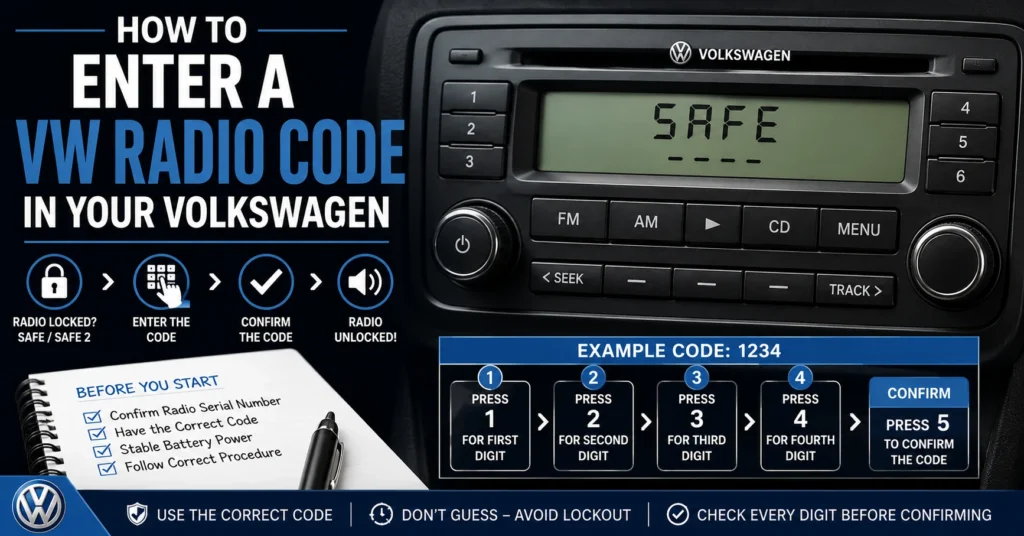
The Basic VW Radio Code Entry Process
Many older Volkswagen radios use a similar basic principle:
- Turn the radio on.
- Wait for the radio to display the code-entry screen.
- Use the numbered preset buttons to select each digit.
- Check the displayed code carefully.
- Confirm the code using the appropriate button or control for that radio.
- Wait for the radio to accept the code.
However, not every Volkswagen radio uses exactly the same button sequence.
The procedure below is therefore a general guide rather than a universal instruction for every VW radio.
Quick VW Radio Code Entry Guide
| Step | Action |
|---|---|
| 1 | Turn the Volkswagen radio on |
| 2 | Check the display for SAFE, CODE or the code-entry screen |
| 3 | Wait until the radio allows code entry |
| 4 | Select the first digit using the appropriate radio control |
| 5 | Select the second digit |
| 6 | Select the third digit |
| 7 | Select the fourth digit, if your radio uses a four-digit code |
| 8 | Check all displayed digits |
| 9 | Confirm the code using the correct control for your radio |
| 10 | Wait for the radio to accept the code |
Do not assume that pressing the same button sequence works on every Volkswagen radio.
How to Enter a Code on Older VW Radios
Many older Volkswagen radios use numbered preset buttons.
For these radios, the numbered buttons can be used to adjust individual digits of the displayed code.
For example, on a compatible older radio:
- Button 1 may control the first digit.
- Button 2 may control the second digit.
- Button 3 may control the third digit.
- Button 4 may control the fourth digit.
After the correct digits are displayed, another button may be used to confirm the entry.
The exact confirmation button depends on the radio.
Important
The common procedure described above should not be treated as a universal Volkswagen instruction.
Radio models differ.
Always check the controls and display of the radio currently installed in your vehicle.
VW Radio Code Buttons: Quick Reference
| Radio control | Possible function on compatible older radios |
|---|---|
| Preset 1 | Adjust first code digit |
| Preset 2 | Adjust second code digit |
| Preset 3 | Adjust third code digit |
| Preset 4 | Adjust fourth code digit |
| Confirmation control | Accept the displayed code |
| Power button | Turn radio on/off |
| Display | Shows SAFE, CODE or selected digits |
This table describes the common principle used by some older VW radios. The exact function can vary by model.
How Do I Enter Each Digit?
On compatible older Volkswagen radios, the numbered preset buttons can be used to change individual digits.
For example, if the radio needs a four-digit code, you may see four code positions on the display.
A typical procedure is:
First Digit
Use the control assigned to the first digit until the correct number appears.
Second Digit
Use the control assigned to the second digit.
Third Digit
Adjust the third digit.
Fourth Digit
Adjust the fourth digit.
Confirm
Once all digits are correct, use the appropriate confirmation control.
Do not confirm the code until you have checked every digit.
Example of VW Radio Code Entry
Suppose your confirmed radio code is:
1234
On a compatible older radio, the display may need to be adjusted until it shows:
1 2 3 4
The exact buttons used to produce those digits depend on the radio.
The important point is:
Do not enter 1234 simply because it is an example.
Only enter the code that has been confirmed for your particular radio.
Why You Should Not Guess a VW Radio Code
Never use random four-digit combinations to try to unlock a Volkswagen radio.
Repeated incorrect attempts can cause some radios to enter a temporary lockout condition.
This can result in messages such as:
SAFE 2
or prevent another code attempt until the radio has been left switched on for a required period.
Before entering a code, verify:
| Information | Why it matters |
|---|---|
| Serial number | Identifies the radio |
| Radio model | Determines the applicable procedure |
| Manufacturer | Helps distinguish radio systems |
| Part number | Provides additional identification |
| Vehicle model | Provides useful context |
| Code | Must correspond to the radio |
What Does SAFE Mean?
If your VW radio displays SAFE, the radio’s anti-theft security system is active.
This can happen after:
- Battery replacement
- Battery disconnection
- Radio removal
- Installation of another radio
- Electrical power interruption
SAFE does not necessarily indicate a defective radio.
It can simply mean that the radio needs the appropriate security code or recovery procedure.
What Does SAFE 2 Mean?
SAFE 2 can appear after unsuccessful code attempts on some Volkswagen radio systems.
If you see SAFE 2:
Stop entering codes.
Do not continue guessing.
The radio may require a waiting period before another code-entry attempt becomes available.
The exact waiting procedure varies by radio.
If you are unsure, identify the radio and check its specific instructions before continuing.
What If the Radio Does Not Let Me Enter the Code?
If the radio is displaying SAFE and does not immediately allow code entry, don’t assume that the radio is broken.
Some Volkswagen radios require a waiting period after power is restored or after incorrect attempts.
Possible reasons include:
| Situation | Possible explanation |
|---|---|
| SAFE remains on | Radio may be waiting for code entry |
| SAFE 2 appears | Previous incorrect attempts may have triggered a lockout |
| Code buttons do nothing | Radio may not currently be ready for entry |
| Radio resets | Electrical supply may need to be checked |
| Code is rejected | Code may not correspond to the radio |
| Replacement radio | Original vehicle code may belong to another radio |
How Long Should I Wait Before Trying Again?
The waiting period depends on the radio.
Do not assume that every Volkswagen radio uses the same waiting time.
If the radio is locked after incorrect attempts, leave it in the condition recommended for that specific unit rather than repeatedly switching it on and off or entering additional codes.
Most importantly:
Do not keep guessing codes.
What If My VW Radio Code Does Not Work?
If the radio rejects a code, stop and check the information before trying again.
Check the Serial Number
Compare the complete serial number with the label on the radio.
Pay particular attention to:
- 0 vs O
- 1 vs I
- 2 vs Z
- 5 vs S
- 6 vs G
- 8 vs B
Check the Radio
Make sure the code was obtained for the radio currently installed.
Check for a Replacement Radio
If the radio has been replaced, the original vehicle documentation may contain information for the original radio rather than the replacement.
Check the Radio Model
Different Volkswagen radio families can use different security systems.
Check the Entry Procedure
The button sequence for one VW radio may not apply to another.
What If My Radio Was Replaced?
This is one of the most important situations to consider.
If your Volkswagen has a replacement radio, do not automatically use the code associated with the original radio.
Instead:
- Identify the radio currently installed.
- Find its serial number.
- Record the radio model.
- Record the part number.
- Identify the manufacturer if visible.
- Determine the appropriate code-recovery method.
- Enter the confirmed code using the procedure for that radio.
If you need help finding the information on the radio, see:
How to Find Your Volkswagen Radio Serial Number
Can I Enter a VW Radio Code Without the Serial Number?
You may already have the code in your original vehicle documentation.
However, if you need to recover a lost code, identifying the radio and finding its serial number is often an important first step.
The VIN and radio serial number are different.
The VIN identifies the vehicle.
The radio serial number identifies the radio unit.
This distinction is especially important when the radio has been replaced.
VW Radio Code Entry by Radio Family
Volkswagen has used many different radio families over the years.
| Radio family | What to check before code entry |
|---|---|
| Alpha | Identify the exact unit and confirm the code |
| Beta | Check the radio identification information |
| Gamma | Verify the radio model and serial number |
| RCD | Identify the exact RCD model |
| RNS | Identify the exact navigation/radio system |
| Other VW factory radios | Follow the procedure for the specific unit |
The same button sequence should not be assumed to work for every radio family.
VW Alpha Radio Code Entry
Older Alpha radios can use numbered controls for code entry.
Before attempting to enter the code:
- Identify the radio.
- Confirm the serial number.
- Confirm the correct code.
- Check the display.
- Use the controls appropriate to that Alpha unit.
- Confirm the code only after checking every digit.
VW Beta Radio Code Entry
Beta radios can have different control layouts depending on the specific unit.
If your Beta radio is displaying SAFE or requesting a code, first confirm the radio’s identification information.
Do not assume that the exact button sequence used by another Beta radio will be identical.
VW Gamma Radio Code Entry
Gamma radios were used in different Volkswagen applications.
Before entering a code:
- Identify the exact Gamma radio.
- Confirm the serial number.
- Confirm the correct code.
- Check the display.
- Follow the controls for the specific unit.
- Confirm only after checking the displayed digits.
VW RCD Radio Code Entry
RCD radios exist in multiple generations and configurations.
Examples include different RCD models and generations used across Volkswagen vehicles.
The exact entry procedure can vary.
Before entering a code into an RCD radio, identify the complete model.
Do not assume that instructions for one RCD radio automatically apply to another.
VW RNS Radio Code Entry
RNS navigation systems can use different security and identification systems from older Volkswagen radios.
If your RNS unit is requesting a security procedure, identify the exact RNS model before attempting to enter a code.
Some newer Volkswagen infotainment systems also use security and pairing methods that are different from traditional radio-code systems.
VW Radio Code Entry: What to Do and What to Avoid
| Do | Avoid |
|---|---|
| Verify the radio serial number | Guessing the serial number |
| Confirm the code | Entering random codes |
| Identify the radio model | Assuming every VW radio uses the same procedure |
| Check the display | Ignoring SAFE 2 |
| Follow radio-specific instructions | Repeatedly pressing buttons without knowing their function |
| Check a replacement radio separately | Using the original radio’s code automatically |
| Stop if the code is rejected | Continuing with random attempts |
How to Find Your VW Radio Serial Number
If you do not know the serial number, don’t guess.
Start with our detailed guide:
Find Your Volkswagen Radio Serial Number
The serial number may be available in the original vehicle documentation or on a label attached to the radio.
Depending on the unit, you may need to remove the radio to access the identification label.
If you are not comfortable removing the radio, consider asking a qualified automotive audio technician for assistance.
How to Request a VW Radio Code
If you have found the serial number but still need to recover the code, the next step is to determine the appropriate recovery method.
Use our:
If a request is required, see:
Submit a VW Radio Code Calculator Request
Have the following information ready:
| Information | Recommended |
|---|---|
| Complete radio serial number | Yes |
| Radio model | Yes |
| Radio manufacturer | If available |
| Part number | If available |
| Volkswagen model | Yes |
| Vehicle year | If known |
| Photo of radio label | Useful when identification is unclear |
How to Enter a VW Radio Code After Recovery
Once you have confirmed the correct code:
Step 1 — Turn on the Radio
Switch on the radio and observe the display.
Step 2 — Check the Security Message
Determine whether the radio is displaying SAFE, SAFE 2, CODE or another message.
Step 3 — Wait for Code Entry
If the radio is locked, wait according to the procedure for that radio.
Step 4 — Enter the Digits
Use the radio controls to select the individual code digits.
Step 5 — Check the Display
Before confirming, compare every displayed digit with your confirmed code.
Step 6 — Confirm
Use the appropriate confirmation button or control.
Step 7 — Wait
Allow the radio to process the code.
Do not immediately press additional buttons if the radio is processing the entry.
What If the Radio Still Says SAFE?
If SAFE remains after entering a code, don’t immediately try another code.
Check:
- Is the code definitely for this radio?
- Is the serial number correct?
- Is the radio model correct?
- Is the radio currently locked?
- Was the radio replaced?
- Did you follow the correct entry procedure?
- Does this particular radio use a different security system?
If you cannot verify the answer, stop before making another attempt.
What If I Entered the Wrong Code?
If you believe you entered the wrong code:
Do not repeatedly try another random code.
The correct next step depends on the radio.
Some units can enter a temporary lockout condition after incorrect attempts.
Check the radio status and determine the correct procedure for your exact model before trying again.
VW Radio Code Entry for Popular Volkswagen Models
The entry procedure depends primarily on the radio rather than simply the vehicle model.
The same Volkswagen model can be equipped with different radios across different generations.
| Volkswagen model | Important identification |
|---|---|
| Golf | Radio model + serial number |
| Passat | Radio model + serial number |
| Polo | Radio model + serial number |
| Jetta | Radio model + serial number |
| Beetle | Radio model + serial number |
| Tiguan | Exact radio/infotainment system |
| Sharan | Radio model + serial number |
| Touran | Radio model + serial number |
| Touareg | Exact radio/infotainment system |
For this reason, always identify the radio before selecting a code-entry procedure.
VW Golf Radio Code
If you have a Volkswagen Golf with a locked radio, identify the radio first.
Different Golf generations can have different factory radio systems.
You can continue with our VW Golf radio code guide.
VW Passat Radio Code
Passat vehicles have used multiple radio generations.
If you need a VW Passat radio code, confirm the radio currently installed before entering a code.
VW Polo Radio Code
Different Polo generations can use different factory radios.
If you need a VW Polo radio code, identify the radio and serial number first.
VW Jetta Radio Code
Jetta radios can differ by generation and equipment.
Do not assume that a code-entry procedure for another Jetta radio will be identical.
VW Beetle Radio Code
Beetle and New Beetle radios can use different systems.
Identify the exact radio before attempting code entry.
VW Tiguan Radio Code
Tiguan vehicles have used different generations of radio and infotainment systems.
Identify the exact unit before assuming that a traditional four-digit radio code applies.
See our VW Tiguan radio code guide.
Frequently Asked Questions
How do I enter a VW radio code?
On some older Volkswagen radios, the numbered preset buttons are used to adjust the individual digits, followed by a confirmation control. However, the exact procedure varies by radio model.
Which button confirms a VW radio code?
There is no universal confirmation button for every Volkswagen radio. Some older radios use a numbered preset button, while other units can use different controls. Identify the exact radio before assuming which button confirms the code.
Can I use button 5 to confirm my VW radio code?
Some older Volkswagen radios may use button 5 as a confirmation control, but this should not be treated as a universal VW procedure. The correct button depends on the radio.
What if my VW radio says SAFE?
SAFE generally indicates that the radio’s anti-theft security system is active. Verify the radio identification and follow the correct recovery and entry procedure.
What does SAFE 2 mean?
SAFE 2 can indicate that the radio has entered a temporary lockout after unsuccessful code attempts. Stop guessing codes and follow the procedure for the specific radio.
Why isn’t my VW radio accepting the code?
Possible reasons include an incorrect serial number, a code belonging to another radio, a replacement radio, a locked unit, or an incorrect entry procedure.
Can I enter the code without knowing the serial number?
If you already have a confirmed code from the correct source, you may not need the serial number during the actual entry process. If you need to recover a lost code, however, identifying the radio and serial number is often an important first step.
Does every VW radio use the same code-entry procedure?
No. Volkswagen has used many different radio models and generations.
Can I use the code from my old radio?
If the radio has been replaced, do not assume that the old radio’s code will unlock the replacement.
Should I keep trying if the radio rejects the code?
No. Stop and verify the radio, serial number, code and entry procedure before making another attempt.
VW Radio Code Entry Checklist
Before confirming a Volkswagen radio code, check every item below:
| Question | Check |
|---|---|
| Is this the radio currently installed? | ✓ |
| Did I identify the exact radio model? | ✓ |
| Did I record the complete serial number? | ✓ |
| Does the code belong to this radio? | ✓ |
| Is the radio ready for code entry? | ✓ |
| Is SAFE 2 currently displayed? | ✓ |
| Am I following the correct button procedure? | ✓ |
| Did I check every digit before confirming? | ✓ |
If any answer is uncertain, stop and verify the information.
The Safe Way to Recover and Enter a VW Radio Code
The best approach is to treat radio-code recovery as a sequence rather than a guessing game.
Identify the radio.
↓
Find the serial number.
↓
Determine the appropriate recovery method.
↓
Confirm the correct code.
↓
Follow the procedure for the specific radio.
↓
Check every digit.
↓
Confirm the code.
This approach reduces the risk of entering an incorrect code and causing a temporary lockout.
Start With Your VW Radio Code
If you have a locked Volkswagen radio, start by identifying the unit.
If you need the serial number:
Find Your Volkswagen Radio Serial Number
If you already have the serial number and need to continue with recovery:
If you need to submit information for a request:
Submit a VW Radio Code Calculator Request
And once you have the confirmed code:
Follow the radio-specific code-entry procedure and enter it carefully.
Do not guess and do not repeatedly enter random codes.
VWRadiocode.com focuses on Volkswagen radio-code recovery, radio identification, serial-number guidance and safe code-entry information.